Wireless mic for PC
WO Mic is a unique utility that has the power to turn your android device into a microphone device for your computer. This can come in handy for your voice chatting, recording, and recognition needs. For the record, it offers nearly little latency just like the real microphone devices. However, the quality can still vary depending on the transport and environment.
Top Recommended Alternative

You can download this application for free but some items will be available for in-app purchases. Unfortunately, though, it doesn't allow you to apply audio effects. You can check out EZ Voice for a more extensive recording capability.
How does WO Mic work?
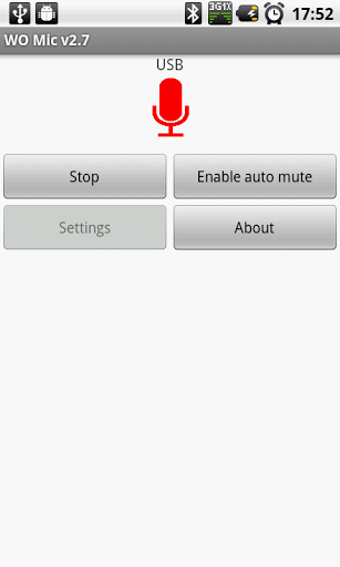
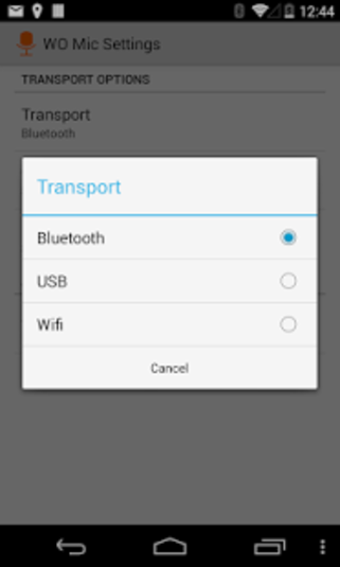
The first thing you need to do in order to utilize your smartphone as your mic is to choose and link the appropriate transport between your mobile and computer device. For your android device, you'll be able to use either USB, Bluetooth, Wi-Fi, or Wi-Fi Direct as your mode of transport. Once launched, you must go to the Connection tab, click Connect option, and choose the Transport type you prefer.
However, it is more suggested for you to use USB transport as it is usually more robust than the wireless connections. Moreover, it contains lower latency and even a higher bit rate. To connect, just connect your USB cable to your computer and select USB from the Transport type options on your PC and smartphone devices. Tapping the play icon on your phone screen will activate the mic function immediately.
To utilize wireless connections, you'll have to choose the 'Connection' and the 'Connect' options from the WO Mic desktop app. A connect dialog will prompt you to select the transport type that you've chosen on your phone. For Bluetooth connection, just tap its name from the dropdown list. Connection through Wi-Fi will require you to enter your IP address while SoftAP's IP address will be necessary for Wi-Fi Direct linking.
Amusing microphone alternative
WO Mic is a specialized utility that can turn your simple mobile device into a functional and high-quality microphone tool. It offers a lot of transport types that you can use from the USB cable to various wireless connections. This will come in handy especially if you do not want to buy new mic equipment as it can definitely be an affordable alternative.